Who Needs a Web Accessibility Audit
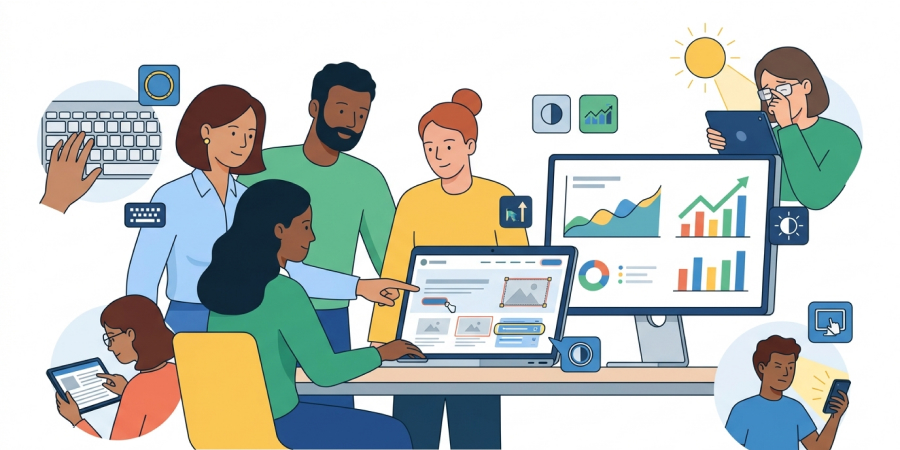
A web accessibility audit is a comprehensive review of a website to evaluate its compliance with accessibility standards.
Website accessibility means that it is convenient and usable for the widest possible range of users:
- for people with visual impairments, which is often the first association in this context;
- for users with motor, hearing, or cognitive impairments;
- for people who use only a keyboard instead of a mouse or touchpad;
- for those using the site in bright lighting conditions;
- for those in public places who cannot listen to audio content.
This list is not exhaustive.
An accessibility assessment includes checking whether the website is convenient for all of these user groups. You can learn more about the concept of a website accessibility audit in the related article on our blog: What Is a Website Accessibility Audit.
A website compliance review against WCAG (Web Content Accessibility Guidelines) is carried out by web accessibility specialists. The cost depends on the website complexity, the number of pages, the depth of the audit, and several other factors.
This naturally raises a few questions:
- Who needs such an audit?
- Is it worth allocating a budget for this type of website review?
In short, an accessibility audit is essential for anyone who does not want to lose their audience because of existing, yet often invisible, interface barriers.
A Web Accessibility Audit Is Essential for Business Owners and Website Owners
Websites are created to generate or increase business revenue. Whether it is an online store, a ready-made IT product, or a brochure website, all of them are designed to introduce potential customers to a company’s services or products and encourage them to call, send a message, or place an order directly through the website.
One of the goals of a business, particularly marketing and SEO, is attracting an audience. The next goal and stage of the sales funnel is encouraging the visitor to stay on the website and move to the next step.
Website accessibility directly contributes to a comfortable browsing experience and helps users complete their intended journey.
Let’s look at a few practical cases where accessibility issues become the reason for losing potential customers.
Accessibility Issues in an Online Store
Users of an online store may encounter many barriers due to accessibility issues. Let’s look at one common example.
- The customer adds a product to the cart and proceeds to fill out the personal details form;
- They enter the first name in a field labeled “Name”;
- They click the “Complete Purchase” button, but the form is not submitted;
- In some cases, the field may be highlighted in red;
- An error message appears near the field — “Incorrect data entered”;
- The user checks their details again, everything seems correct, but they still cannot submit the form.
What Do We See Here?
This fails to meet the accessibility requirement that error messages must be informative, understandable, and provide guidance on how to fix the issue.
The user might guess that the form expects additional information, such as a last name, and that it is required for submission. However, this was not communicated anywhere.
How Can This Be Fixed?
The field label could be improved, for example: “Full Name (including first and last name)”. Or the error message could clearly state: “Please enter your first name and last name”.
Most likely, the customer will become frustrated with the website and place the order elsewhere.
Accordingly, this implementation contains accessibility issues that would be identified during a WCAG compliance audit.
Accessibility Issues on an Offline Store Landing Page
For example, a flower shop has a landing page.
- A potential customer is outside in bright sunlight;
- They open the website on their phone and plan to call the store to check flower availability;
- The website background is white, and the phone numbers are displayed in light gray;
- The information is so difficult to see on the phone screen that the contact details may be missed entirely;
- Even if the user does find the contacts, further barriers may arise: the phone number might not be clickable for a direct call or could be impossible to copy.
What Do We See Here?
This fails to meet the accessibility requirement for color contrast. Specifically, the content and background colors must meet at least the minimum contrast ratio.
This check is an integral part of a website accessibility audit.
Most likely, the customer will move to the next website in the search results and call another store.
Accessibility for Eyewear Store Websites
According to publicly available statistics, the core business of optical retailers is selling prescription glasses. Therefore, their primary customers are people with visual impairments.
This may seem surprising, but many optical store websites are not accessible.
For example, some content may be displayed in very small text.
This is not necessarily a critical issue because browsers allow users to adjust the base font size. The problem arises when the website ignores these settings and displays only a fixed font size. As a result, users may be unable to access complete product information and lose interest in staying on the website.
There is no accessibility criterion that defines a minimum font size. In other words, there is no fixed minimum text size requirement in pixels.
However, there is a criterion that requires the website to adapt to browser font size settings without losing functionality. A web accessibility audit for an optical retailer website would help identify such an issue.
These are only a few examples. There can be many more issues. As a result, businesses often lose customers without even realizing the reason.
When reviewing conversion metrics, it may seem that the product simply does not match customer expectations. In reality, users may leave because of inconvenience or the inability to complete an order.
An accessibility audit helps identify the points where the website loses users and the business loses customers.
A Web Accessibility Audit Is Important for Developers and Product Teams
Product teams and development teams are also interested in making the website accessible to as many users as possible.
In an ideal scenario, it would be great if the entire team — product managers, designers, developers, and QA engineers — received accessibility training and built the product from the start based on these principles.
However, we know that reality is different. In practice, the most that usually happens is allocating a budget for an accessibility assessment to identify areas for improvement or confirm that the website meets all requirements.
Such a review may be conducted before launching a new product. More often, however, it is postponed indefinitely, and further updates only worsen the existing accessibility issues.
Conducting an accessibility audit before launching a new website helps identify weak points and fix them early, which is usually significantly easier and less expensive. An additional benefit is that the entire team becomes familiar with accessibility requirements and is more likely to follow them going forward.
Over time, a website may undergo significant changes as the product evolves and improves. Along with that, new issues may arise that were not present initially and that the team may not even suspect. That is why it is also worth planning an audit after a redesign or major functionality changes.
Product teams should also pay attention to user feedback and declining conversion rates. Potentially, the reason may be accessibility issues introduced during recent website updates.
A website accessibility audit can help the CTO assess the technical state of the codebase, technical debt, and build a backlog.
Public sector and non-profit projects should also be mentioned separately. For them, an accessibility audit is equally critical, as such platforms often provide services or information for people with disabilities, visual impairments, or motor impairments. Government service websites must be accessible to all citizens.
As we can see, a website accessibility audit is essential for commercial companies, public sector organizations, and non-profit projects alike.
It is beneficial both for business owners who want to attract more customers and for teams developing the product who want to maintain quality. The earlier accessibility issues are identified, the less time and money will be required to fix them.
Frequently Asked Questions About Website Accessibility Audits
How Much Does a Website Accessibility Audit Cost?
The cost of an audit is calculated individually and may depend on:
- the target WCAG compliance level (A/AA/AAA);
- the scope of the review (number of pages);
- website complexity;
- the auditor’s qualifications.
How Long Does a Website Accessibility Audit Take?
The duration depends on the project's scope. For a single complex page, a comprehensive manual audit can take up to 2 business days.
When Should a Website Accessibility Audit Be Conducted?
A website should be reviewed for accessibility if such an audit has never been conducted before. In addition, it is highly recommended before product launch, after a redesign, or after major functionality changes. It is also advisable in cases of declining conversion rates or user complaints.
How Often Should the Audit Be Repeated?
After significant website updates, redesigns, or the addition of new user flows.
Does a Small Business Need an Accessibility Audit?
Yes. An accessibility assessment is important for anyone who does not want to lose potential customers. For a small business, every customer is especially valuable.
Want to improve your website’s accessibility?
Submit a request with a brief description of your project and goals, and we’ll get in touch.
Our services
Accessible UI components
Reusable, accessible UI components built with semantic HTML, keyboard support, and screen reader compatibility.
View componentsAccessibility Services
Practical accessibility audits, consultations, and support for product teams, designers, and developers
Explore our services